Comics Maker
Open navigation
Resources
Anime character creatorCreate an original anime character from text or a reference image.Manga translatorAI manga image translator pageComic translatorComic page translator workflowComic Script MakerPlan pages, panels, dialogue cues, captions, SFX, and art prompts.Manhwa CropperSplit a long manhwa or webtoon image into reviewed PNG or JPG slices and download an ordered ZIP.AI storyboard generatorBreak a scene into purposeful shots, revise camera and continuity notes, generate selected frame drafts with the project’s live image pipeline, then export the working board.Plot generatorDefine the protagonist, central conflict, audience, length, tone, and ending. Generate a structured premise, major beats, turning points, and scene-by-scene outline on this page.AI character creatorTurn scattered character ideas into an editable design specification for games, animation, illustration, brand concepts, and story pitches. Approve the identity, wardrobe, palette, and pose first; generate one concept image second.Storybook makerPlan a children's story, teaching story, or family memory as a sequence of readable pages. Edit the text and art direction, then generate and download individual page illustrations.AI character designBuild a reviewable character design brief, turn it into an editable specification, and generate one concept image to check the silhouette, outfit, palette, and pose.AI character sheet generatorDefine identity anchors, outfit construction, palette, props, and requested views, then generate one clearly labeled concept character sheet for visual development.AI character pose generatorPlan line of action, balance, camera view, hand visibility, and framing, then generate one reviewable character pose concept as a downloadable PNG.Character expression sheet generatorPlan a character expression sheet from identity anchors, emotion beats, intensity, head angles, style, and grid requirements, then generate one downloadable raster concept sheet.AI background generatorTurn a structured location, weather, perspective, depth, staging-space, style, and aspect brief into one downloadable comic or anime background image.
AI character pose generator

Generate a character pose from a production-ready brief

Write the identity details that must remain recognizable, choose the action, camera view, weight distribution, hand visibility, and composition frame, then generate one full-body pose concept on this page.

Text-directed pose briefDownloadable PNG

Plan one character pose

Separate who the character is from what the body is doing. The planner turns those decisions into one focused image prompt.

Include age range, face and hair, body type, clothing layers, footwear, signature prop, and two or three stable colors. Text helps continuity but cannot guarantee an exact identity across separate generations.

267/1400

Frame controls composition, not the exported pixel dimensions. The current image model returns one flat PNG.

Pose concept result

Pose concept result

Full-body comic courier in a balanced standing contrapposto pose

Curated output evidence

One identity anchor, three different pose problems

These examples were generated for this page from the same written courier identity. They are evidence of the kind of single pose concept the tool produces, not a promise that separate jobs will reproduce an identical face or every garment detail.

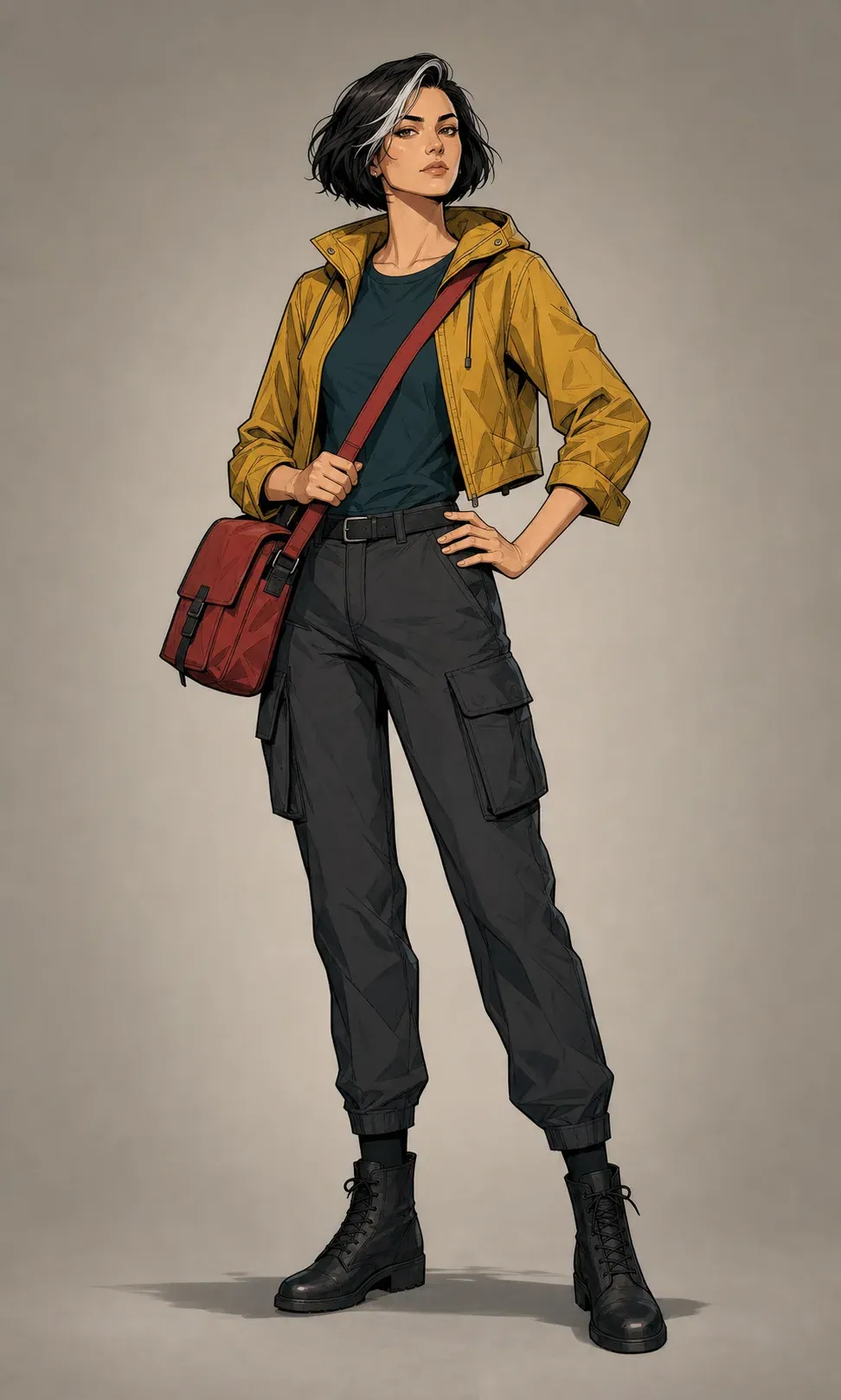
Full-body comic courier in a balanced standing contrapposto pose

Stable contrapposto

Stable support · front three-quarter · both hands clear

The standing leg carries the weight, the free hip releases, and the shoulders counterbalance the pelvis. Both boots and hands stay visible, making this a useful baseline for costume and silhouette review.

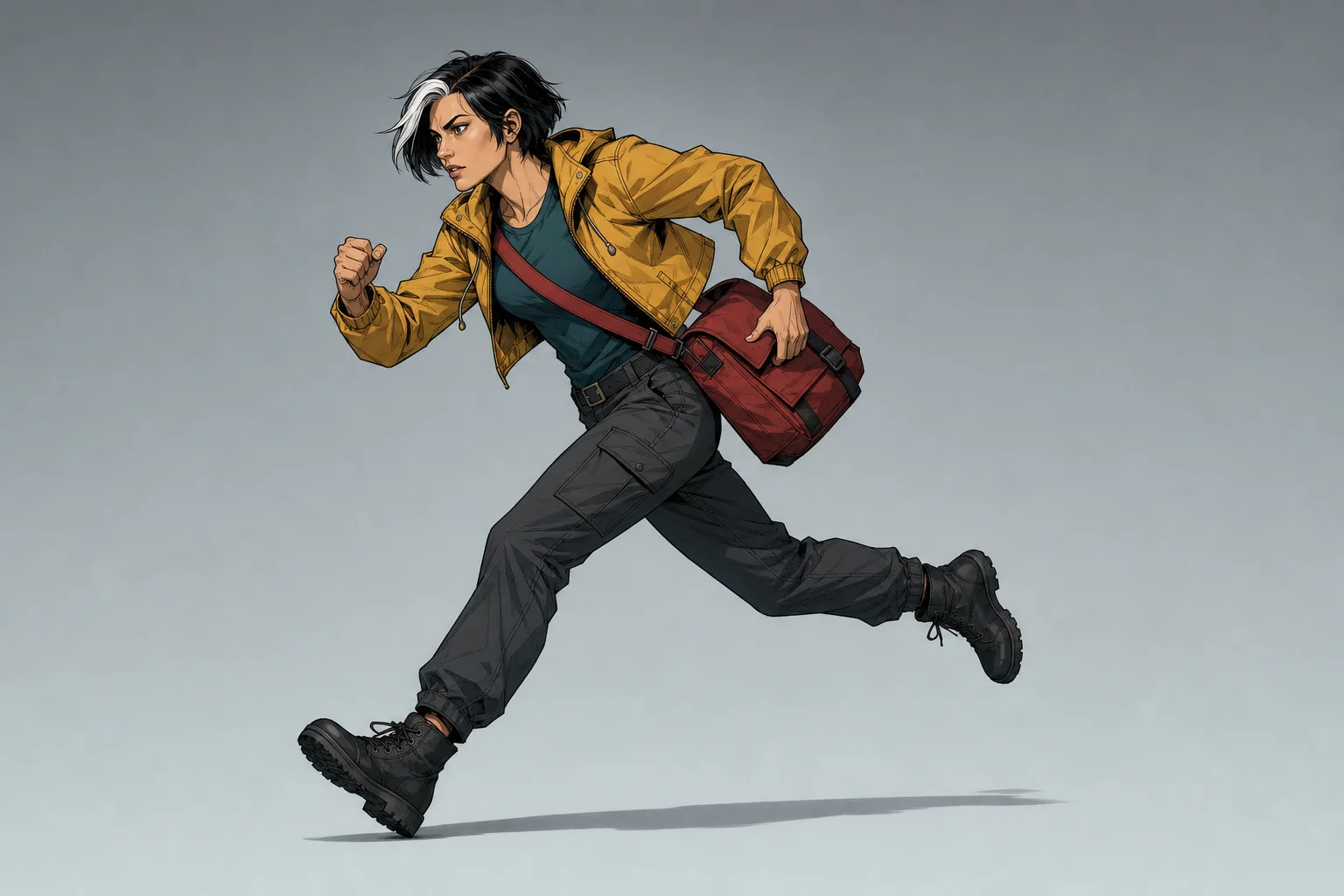
Full-body comic courier sprinting forward with a diagonal line of action

Forward sprint

Forward momentum · side-biased view · landscape frame

The torso leads the support, the rear leg explains propulsion, and lead room keeps the movement from colliding with the frame. The satchel follows the same directional momentum.

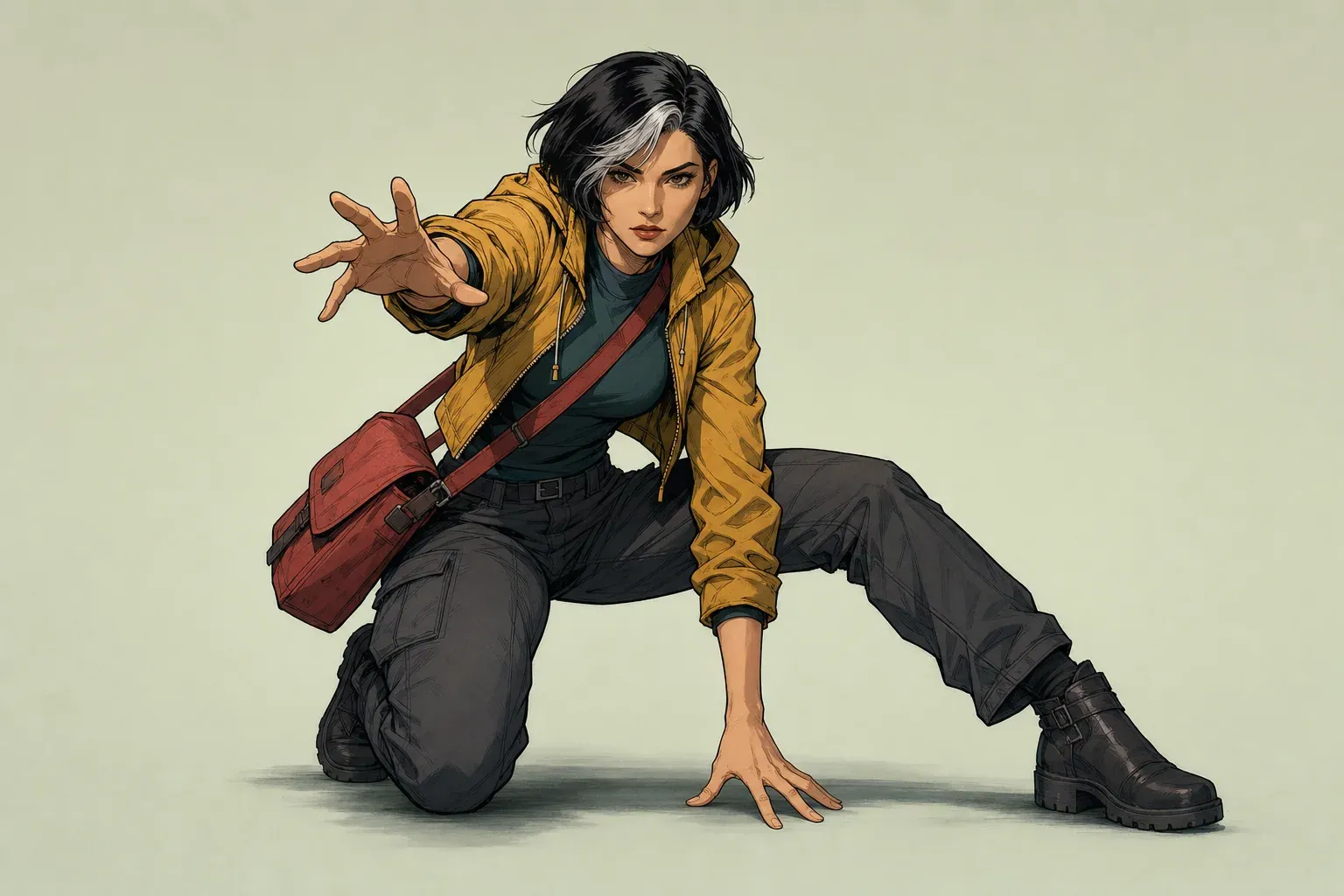
Comic courier in a low crouch reaching toward the viewer

Low reach

Low center of gravity · moderate foreshortening · hands visible

The planted hand and bent leg explain the support while the reaching hand introduces foreshortening. This is the kind of result that needs close review for finger count and limb overlap.

Pose direction

What an AI character pose generator actually controls

An AI character pose generator turns a written body-direction brief into one flat character image. The useful task is not simply asking for a cool pose. It is deciding what the body must communicate, where the character carries weight, which joints drive the action, what the camera must reveal, and which identity details should remain recognizable. This page keeps those decisions separate so a creator can inspect the result and revise the failed variable instead of rewriting a vague prompt.

The tool begins with a character identity anchor. That anchor describes stable facts: approximate age, facial structure, hair shape and color, body type, clothing layers, footwear, signature prop, and limited palette. It then adds the pose action, camera view, balance condition, hand visibility, and composition frame. The server combines those fields into one focused prompt and submits one image job to the site's existing queue. The page shows queued, running, completed, and failed states, and it keeps the completed PNG on the same canonical URL.

A pose concept is most useful as development evidence. It can help an artist test a silhouette, establish an action beat, brief an illustrator, block a storyboard panel, or compare two staging directions. It is not a rigged 3D character, an animation, a layered PSD, a skeletal pose file, or a guarantee of turnaround-level identity consistency. The output is one raster image. Production teams should review it at full size and redraw or correct details when anatomy, costume continuity, or prop geometry must be exact.

This task is intentionally different from adjacent tools. A character creator defines who the character is. A character sheet organizes approved design views and details. An expression sheet studies facial performance. Camera-angle control directs the relationship between viewer and scene. The pose generator focuses on the body in one action: line of action, support, balance, limb placement, silhouette, and readable hands and feet.

Generate pose concept
Standing courier pose used to explain balance in AI character pose generation

Pose brief

Write an identity anchor before describing movement

Start with identity details that can be checked visually. Adult courier is too broad. Adult courier in her early thirties, angular face, short black bob with one silver forelock, athletic medium build, mustard cropped rain jacket, dark teal shirt, charcoal cargo trousers, black ankle boots, and a muted red cross-body satchel gives the generation a bounded design vocabulary. The description does not need fictional biography unless that biography changes the visible body, clothing, prop, or posture.

Order the anchor from the character outward. Name age range and presentation, then face and hair, then build, then garments from outer layer to footwear, then a signature object, and finally the palette. Concrete nouns are more diagnostic than stacks of style adjectives. If the jacket disappears, you know which clause failed. If the prompt only says cinematic, dynamic, premium, expressive character, there is little visual evidence to compare.

Keep pose instructions out of the identity anchor. Writing crouching courier with windblown jacket in the identity field makes it harder to reuse the character for a standing or guarding pose. Stable details belong in the anchor; changeable performance belongs in the action and balance controls. This separation also reduces contradictions such as relaxed posture plus airborne leap or both hands visible plus both hands behind the back.

Text continuity has limits. Separate image generations can change facial proportions, hair part, garment closures, pocket placement, shoe details, and prop shape even when the words stay identical. Treat the anchor as a review checklist, not a mathematical lock. If exact identity is required across a sequence, approve a character design in a dedicated character workflow and use manual drawing, controlled reference tools, or post-production methods that genuinely support identity preservation.

Generate pose concept

Line of action

Use one directional idea for the whole body

The line of action is an imaginary directional sweep through the figure. In a relaxed standing pose it may curve gently from the head through the spine into the supporting leg. In a sprint it often becomes a forward diagonal. In a crouch it compresses and redirects. The line is not an anatomy mark and it does not appear in the output; it is a planning device that helps the head, rib cage, pelvis, and limbs participate in the same action.

One clear line usually reads better than several competing gestures. A sprinting torso that leans forward while the pelvis and feet behave like a static portrait produces a mannequin with decorative limbs. A reaching arm should pull the shoulder girdle, turn or extend the rib cage, and cause the support leg to react. A defensive guard should protect a centerline, plant or adjust the feet, and distribute tension through the shoulders and hands. Ask what initiates the motion and which body part completes it.

Silhouette is the quickest test. Reduce the result to thumbnail size or imagine it filled with black. Can you tell whether the figure is running, crouching, leaping, reaching, guarding, or merely standing? Limbs that overlap the torso without purpose can hide the action. A side view can make a sprint readable, while a front three-quarter view reveals torso twist and both sides of the costume. Camera choice should expose the action, not fight it.

Avoid describing every joint independently. A prompt that micromanages exact elbow degrees, knee angles, finger directions, head tilt, hip rotation, and foot rotation can become internally inconsistent. Use the action control for the main gesture, the balance control for physical logic, and the identity field for the visible design. Add only one or two truly essential specifics, such as reaching toward an off-frame ledge or protecting a satchel with the rear hand.

Generate pose concept
Sprinting comic courier demonstrating a diagonal line of action and forward momentum

Weight and balance

Make the center of gravity explain the pose

A believable static pose has a support area: the space under and between the body parts touching the ground. In contrapposto, most weight travels through one standing leg, the pelvis shifts, the free leg relaxes, and the shoulders counterbalance. In a low crouch, bent legs widen or lower the support. If the projected center of mass falls far outside that area without a step, brace, or external force, the figure looks accidentally unstable.

Forward momentum is different from a stable lean. During acceleration, the center of mass can lead the current support because the rear leg is pushing and the next footfall is coming. The body should show that chain: torso direction, arm swing, hip drive, knee lift, push-off foot, and clothing or prop movement. If the torso leans forward but both feet are planted symmetrically, the pose often feels like a tilted cutout.

Controlled imbalance is useful for dodging, slipping, recovering, reaching, or preparing a directional change. It needs an explanation. A foot may pivot, a hand may brace, the torso may counter-rotate, or an arm may extend opposite the falling direction. Airborne action removes the support area entirely, so the figure's limbs and loose clothing should share one momentum rather than pointing in unrelated directions.

Review ground contact closely. Feet should meet a coherent floor plane, not float at different heights. The ankle should align with the direction of pressure. A planted boot should not bend like fabric, and a pointed toe should not carry the full body unless the action supports it. The generated background is intentionally plain so these mechanical relationships are easier to see.

Generate pose concept

Depth and camera

Control foreshortening without losing anatomy

Foreshortening occurs when a limb points toward or away from the viewer and its apparent length compresses. It can create force and depth, but it also increases the chance of oversized hands, missing forearms, fused fingers, or unclear joint order. A low or high camera adds further depth distortion. Use those views when depth serves the pose, and keep the action simpler when hands, feet, or costume details must be inspected.

The front three-quarter view is the practical default because it shows the face, torso volume, pelvic turn, and limb overlap without collapsing the figure into a flat front view. A side view strengthens silhouette and direction. A low camera can make a leap, guard, or reach feel larger, but nearby feet or hands may dominate. A high camera reveals placement on the ground yet can hide the face behind the brow or shoulders.

Hand visibility is a production choice. Both hands clear is best when gesture, grip, costume reference, or anatomy review matters. Allowing one hand to overlap can make natural action easier, especially when the character carries a satchel, weapon, tool, or garment edge. Relaxed hands reduce unnecessary finger tension for neutral poses. None of these controls guarantees perfect fingers; they tell the generator what must stay reviewable.

Check the anatomical chain rather than judging the hand alone. Follow shoulder to upper arm, elbow, forearm, wrist, palm, and fingers. Do the same from pelvis to thigh, knee, lower leg, ankle, and foot. Occlusion can hide part of a chain, but it should not create an impossible attachment. When a result fails, reduce the camera distortion, choose a simpler action, or request clearer hand visibility before adding more stylistic language.

Generate pose concept
Low crouching courier demonstrating hand foreshortening and a readable support pose

Framing

Keep hands and feet inside the composition

The square, portrait, and landscape options guide composition inside the generated image; they do not change the model's configured export dimensions. Portrait framing suits upright standing, guarding, and vertical jumps. Landscape framing provides lead room for a sprint, reach, fall, or horizontal leap. Square framing is a neutral review canvas. In every case, the prompt asks for one complete figure with required hands and feet inside the frame.

Lead room matters when the action has direction. A runner needs space in front of the face and driving knee. A reaching character needs visible space toward the target, even if the target itself remains off-frame. Centering every action can make motion feel trapped. Conversely, leaving too much empty space can shrink the figure and make hands, face, and costume details difficult to inspect.

Cropping is not automatically wrong in finished comic art, but it is risky during pose development. A cropped boot hides whether the support is believable. A cropped hand hides finger and grip errors. A close-up may be useful for an expression tool, but this page targets full-body action planning. First approve the complete pose; crop it later in the panel composition where the story reason is clear.

Generate pose concept

Production review

Diagnose identity drift, hands, feet, and costume errors

Review the result in passes. First inspect the gesture at thumbnail size: action, silhouette, direction, and balance. Then inspect anatomy: head-to-spine connection, shoulder count, arm length, elbow direction, hand count, finger separation, pelvis, knee direction, ankle, and ground contact. Finally inspect identity: face shape, hair silhouette, distinctive color, garment layers, closures, footwear, and prop design.

Identity drift is any unintended change to stable details between the anchor and the image, or between one generation and another. Common examples are a different facial age, reversed hair part, changed jacket length, extra straps, missing boots, a redesigned bag, or colors migrating between garments. A strong pose with the wrong character is not a finished production asset. Record which stable detail failed and strengthen that noun in the next anchor.

Do not fix everything at once. If the silhouette is good but the hands fail, keep identity, action, camera, balance, and frame stable, then choose both hands clear or reduce foreshortening. If the pose feels weightless, change the balance mode or action before rewriting the wardrobe. If the face changes, simplify decorative costume clauses and move the most distinctive identity details earlier in the anchor.

The queue retries eligible technical failures, and a final failed job receives an automatic credit refund through the existing image workflow. A technically completed image is still a creative draft. Credits are not refunded because a valid generated image needs artistic revision. The page therefore makes review criteria visible before generation and provides regenerate only as an intentional new job.

Generate pose concept

Adjacent workflows

Use the right page for identity, expressions, sheets, and camera

Use the AI character creator when the main question is who the character is: face, hair, clothing, palette, role, and baseline visual direction. Use a character sheet workflow when you need an organized reference with approved views, proportion notes, and recurring design evidence. Use an expression sheet when the body can remain stable and the task is facial performance across emotions.

Use AI camera angle control when the main problem is where the viewer sits in relation to an existing scene concept. Camera angle can influence pose, but it does not replace pose direction. This page includes a camera-view choice only to make the selected body action readable. It does not manage a multi-character scene, background staging, lens package, shot sequence, or panel continuity.

After approving a pose concept, move to the comic panel generator when you need environment, other characters, props, lighting, and story context in a finished frame. Use the speech-bubble generator after the visual composition has protected readable negative space. Keeping these tasks on separate canonical pages prevents vague all-in-one prompts and makes each revision easier to diagnose.

Generate pose concept

AI character pose generator questions

What is an AI character pose generator?

It is a text-directed image tool that turns a character identity anchor plus action, camera, balance, hand-visibility, and framing choices into one flat pose concept image.

Can it keep exactly the same character in every pose?

No exact identity lock is promised. Reusing a concrete identity anchor can reduce drift, but separate generations may change facial proportions, hair, clothing details, colors, or props and must be reviewed.

Can I upload a character reference image?

Not on this page. The current pose workflow is text-directed. It does not claim reference-image identity preservation or pose transfer.

Does the frame option change PNG dimensions?

No. Square, portrait, and landscape guide the composition inside the image. The deployed model currently returns one flat PNG using its configured image size.

How do I get better hands and feet?

Choose both hands clear, reduce extreme foreshortening, use a front three-quarter or side view, keep the action simple, and explicitly require the complete figure inside the frame. Always inspect the result at full size.

What should an identity anchor include?

Use visible stable details: age range, face and hair, body type, outer and inner clothing layers, lower garment, footwear, signature prop, and a small stable palette.

Why does the pose look like it is falling?

The center of mass may not align with the support area, or the image may not show a step, push-off, brace, or external force. Select a clearer balance mode and simplify the action.

What happens if generation fails?

The existing image queue retries eligible failures. If the final attempt fails, the job is marked failed and its eligible image credits are refunded automatically.

What file can I download?

A completed job provides one flat PNG. It does not include layers, a skeleton, a 3D rig, vector paths, animation, or a pose data file.

Continue with the right production tool