AI anime generator

AI anime generator for complete scene illustrations

Describe the subject, setting, action, camera, light, and color you need. Generate an original anime scene, environment, action keyframe, or poster on this page, then review and download the finished PNG.

Text or reference image Four scene types PNG download

Create one anime image

Write the picture you want to see

0/1600

Generated image

Curated AI-generated anime scene of a courier at a rainy station
Curated example, not your result. Complete a live job to replace it.

Generated examples

Prompt, settings, result, and an honest quality check

These examples were created for this page from the prompts shown below. They demonstrate different jobs rather than promising identical output. Review composition, anatomy, object relationships, accidental marks, and scene accuracy in every result you generate.

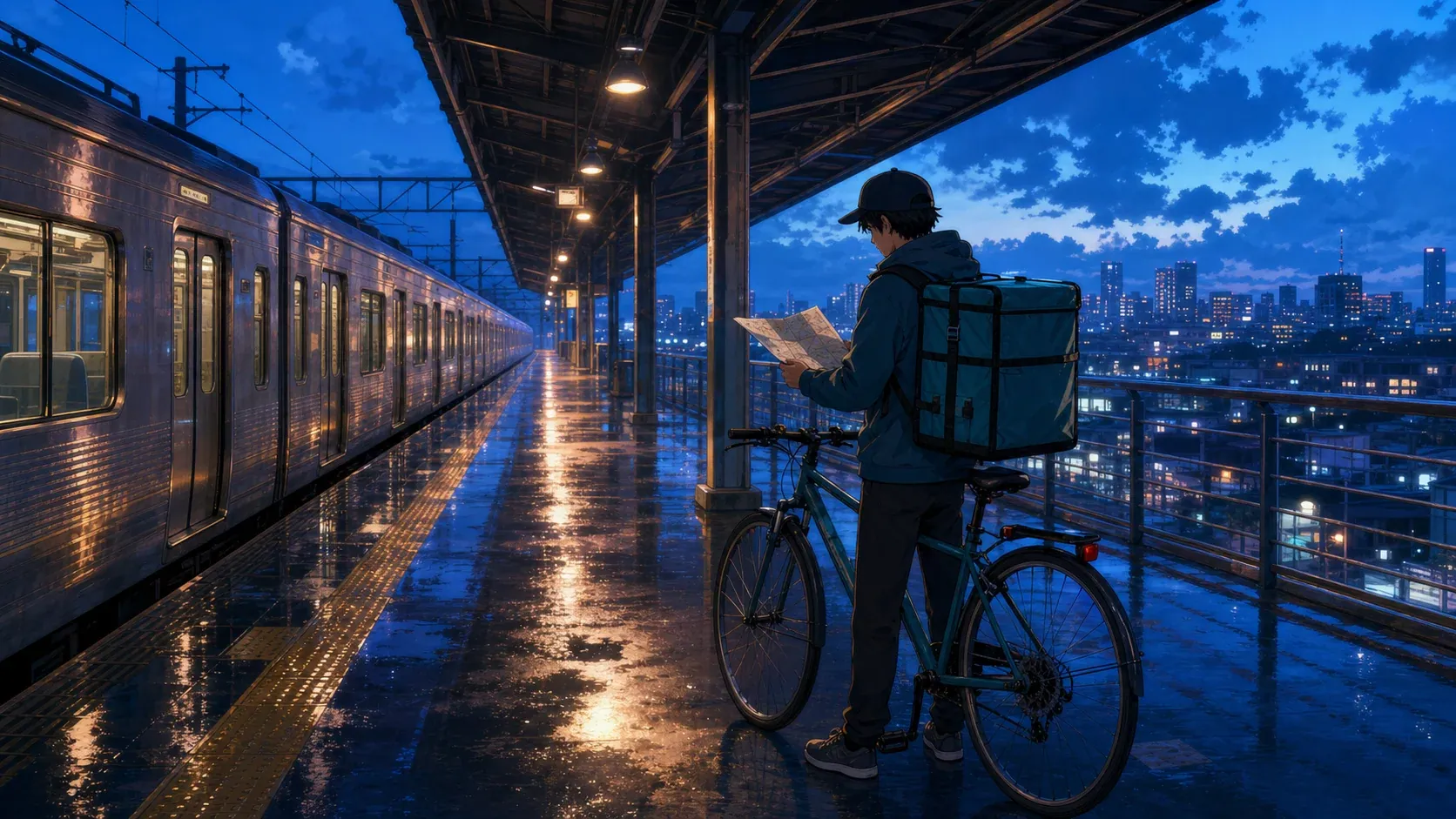
Wide anime scene of a courier, train, bicycle, wet platform, and city at blue hour

Rain-station delivery

Character in a scene · Cinematic paint · Wide establishing

Prompt: One courier unfolds a map beside a bicycle on a wet elevated platform; silver train, blue hour, amber lamps, distant city.

Quality check: The platform lines establish depth and the warm reflections lead toward the courier. The map contains tiny marks, so it should not be treated as readable text.

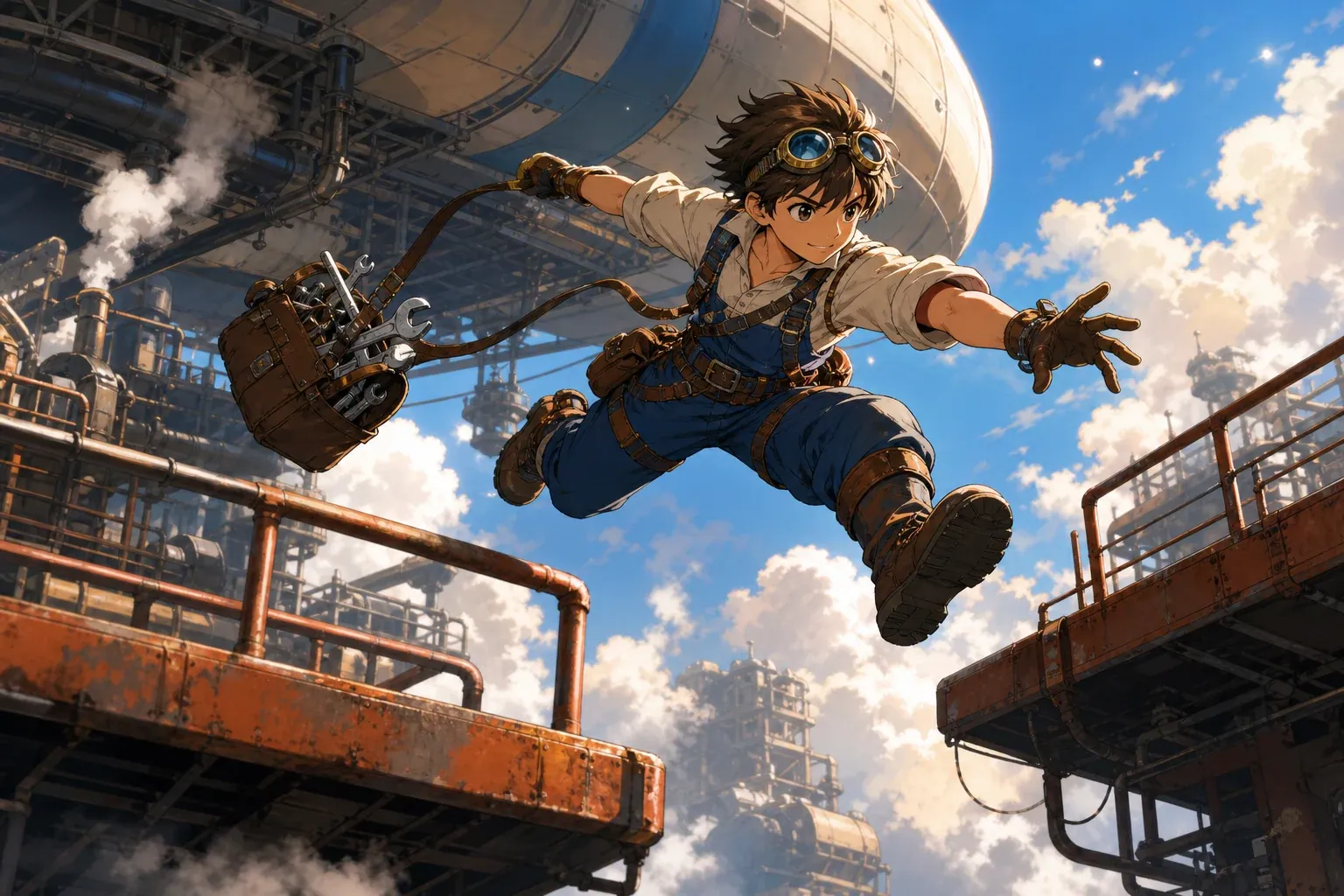
Dynamic anime action keyframe of a mechanic jumping between industrial gantries

Skyship maintenance leap

Action keyframe · Clean cel · Dynamic angle

Prompt: One mechanic leaps between gantries, tool satchel swinging behind, steam below, low camera, rust orange and cobalt palette.

Quality check: The diagonal pose and foreground platforms make the movement clear. Check both hands, tool connections, and the landing point before production use.

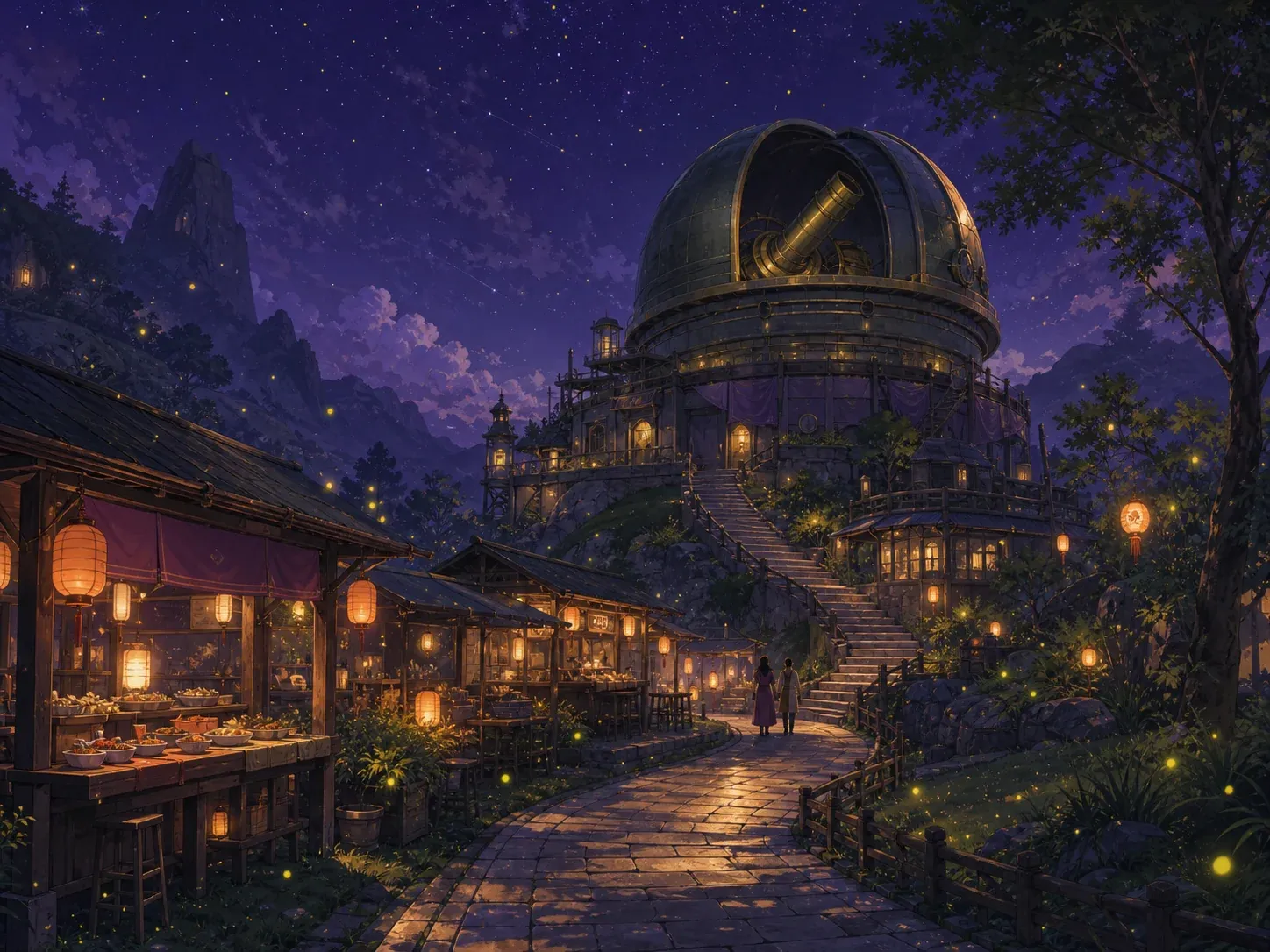
Anime environment of lantern stalls below an old brass observatory at night

Observatory night market

Anime environment · Cinematic paint · Wide establishing

Prompt: Lantern market beneath an old observatory, brass telescope dome, curved path, small visitors, summer fireflies, violet night sky.

Quality check: Architecture remains the subject and small figures establish scale. The stalls contain decorative marks rather than usable signage.

Start with the scene

Generate anime art from a text prompt

An AI anime generator is most useful when the prompt describes a picture rather than a plot summary. Begin with the visible subject and the exact moment: who or what is in frame, what they are doing, and where the action takes place. Add the camera distance, time of day, light source, weather, and a limited color relationship. These choices give the image model a hierarchy instead of a loose collection of genre words.

The rain-station example starts with one courier reading a delivery map beside a bicycle. The environment is an elevated platform after rain, with a silver train to the left and a city beyond the rail. The requested wide establishing composition keeps the station readable, while blue-hour light and amber lamps supply a controlled cool-versus-warm palette. Every phrase can be checked in the result; none depends on private backstory.

A practical prompt order is subject, action, setting, composition, lighting, palette, then exclusions. For example: “one bicycle courier unfolding a map beside a parked bicycle; rain-soaked elevated station; silver train on the left; wide establishing shot; blue-hour ambient light with warm platform lamps; indigo, teal, and amber; no text or logos.” The order does not need special syntax. It simply makes the desired focal point and supporting details unambiguous.

Avoid combining several moments in one image. “The courier arrives, argues with a guard, boards the train, and remembers home” asks for a sequence, not a single illustration. Choose the one moment that carries the scene—perhaps the map unfolding as the last train waits—and move the other beats into later panels. If your goal is a multi-panel page, use the comic panel generator after the key image is established.

Use the optional reference image for layout, subject cues, costume, props, or color direction you have permission to use. The written prompt should state what matters and what may change. A reference is not a guarantee of exact identity, typography, product design, or character continuity. Re-uploading a cleaner source and naming the preserved features is usually more effective than adding many vague adjectives.

Generate anime art
AI-generated anime scene of a bicycle courier on a rain-soaked elevated train platform

Choose the actual deliverable

AI anime character and scene generation

This page creates complete anime illustrations, not isolated character reference sheets. Select Character in a scene when the person and setting share the storytelling: a mechanic repairing a rooftop antenna, two friends waiting beside a closed arcade, or a courier checking a map at a station. Describe the character only to the level needed for that shot, then spend equal attention on the action, place, camera, and light.

Choose Anime environment when location design is the product. Architecture, path layout, landmarks, prop clusters, weather, and light should dominate the prompt; people can remain small scale references. This is appropriate for establishing shots, visual development, pitch boards, chapter openings, game-location concepts, or the background reference that a comic artist will redraw. It is not the right mode for a close facial portrait.

Choose Action keyframe for one decisive movement. Name the action in physical terms, identify the direction of travel, and specify the camera angle. The skyship example uses a low camera, a diagonal leap between two gantries, a swinging tool bag, and steam below. Those constraints help the image read as one instant. Review limbs, hands, equipment connections, the landing surface, and foreground overlaps before using any action result.

Choose Poster illustration when you need a finished key visual with one dominant subject and intentional empty space. State where the visual weight should sit and where clean space is required for later design work. The generator does not add reliable headlines or production typography, so request no text and add titles in a layout tool after download. This keeps lettering editable and avoids pseudo-characters inside the image.

For a dedicated character identity, outfit baseline, portrait, or full-body reference, use the anime character creator instead. That page is built around a single reusable character and its face, clothing, expression, and crop. Use this AI anime generator once you need the broader shot: the character acting inside a location, the world around them, a dramatic camera, or a promotional illustration.

Create an anime scene
AI-generated cel-shaded anime action keyframe of a skyship mechanic leaping between gantries

Direct the visual treatment

Choose anime styles without copying a named artist

A useful style direction describes visible production choices: line weight, shadow shape, color range, texture, depth, and mood. It does not need a celebrity artist or studio name. “Clean cel shading, restrained linework, two-step shadows, cobalt and rust palette” is more actionable than asking for a recognizable person’s signature style, and it gives you specific qualities to approve or revise.

Clean cel works for readable character scenes, storyboards, thumbnails, and comic references. It favors defined edges and controlled color blocks. Cinematic paint gives environments more atmosphere, light falloff, and spatial depth; use it for establishing shots and mood pieces. Soft pastel reduces contrast for reflective or gentle scenes. Retro print uses limited color, bold shapes, and subtle paper-like texture for covers or editorial art.

Add a medium or era only when it changes the image: late-1990s print palette, hand-painted background, limited two-step cel shadows, charcoal-like line texture, or faded travel-poster color. Add genre through concrete design language such as coastal science fiction, rural mystery, urban fantasy, workplace comedy, or quiet coming-of-age. Then specify the objects, materials, architecture, and clothing that make that genre visible.

The observatory market example relies on environment choices rather than a named influence: a curved path, lantern stalls, a brass telescope dome, small visitors for scale, summer fireflies, warm pools of light, and a deep violet sky. The result has an anime-world feeling because composition, light, detail density, and color work together—not because it duplicates an existing franchise.

Do not assume a style preset fixes an overloaded prompt. A cel-shaded image can still fail if it contains five unrelated characters, contradictory weather, three camera angles, and several actions. First simplify the scene and visual hierarchy. Then choose the preset that best supports the intended use. The preset is a direction applied to the scene, not a replacement for scene design.

Try a visual direction
AI-generated anime environment of a lantern market beneath an old observatory

Diagnose before spending another job

Refine prompts and regenerate weak results

When a result is weak, identify the first visible failure before changing the prompt. If the image has no clear focal point, remove secondary subjects and state one dominant action. If the scene feels empty, add two or three location anchors rather than generic “more detail.” If the subject is cropped, choose a wider composition and name what must remain visible. If the palette is muddy, limit it to two main families plus one accent.

Change one category at a time. Keep the subject and setting fixed while testing a wide versus medium composition. Keep the composition fixed while changing clean cel to cinematic paint. Keep both fixed while revising the lighting. This small-step method makes it possible to learn which instruction affected the output; rewriting everything creates a different image without explaining why it improved or declined.

Anatomy and object relationships need direct review. Count visible hands and limbs. Check whether fingers connect to the correct arm, feet meet a surface, bicycle parts connect, tools have a plausible grip, and foreground rails do not merge with the body. For a weak action pose, simplify the movement, reduce the number of props, name the direction of travel, and use a medium scene before trying the dramatic angle again.

Reference-driven results may drift when the source is small, cluttered, backlit, or ambiguous. Crop to the relevant subject, remove unrelated borders, and upload PNG, JPG, or WebP under 5MB. In the prompt, separate preserved cues from new instructions: “keep the amber jacket and square bag; replace the background with a rain station; show a wide side view.” A browser cannot restore the local file after sign-in, so choose it again when you return; the written settings remain saved.

Generated lettering, symbols, repeating patterns, hands, jewelry, and mechanical detail can be unreliable. Treat any output as a draft until it is checked at full size. Add dialogue and titles later, correct continuity in an image editor, and obtain a rights review for client campaigns, merchandise, or other high-stakes publishing. A successful generation means the file was produced; it does not certify accuracy or legal suitability.

Refine and regenerate

Regeneration checklist

  • Name the first visible failure.
  • Remove competing subjects or actions.
  • Change one prompt category at a time.
  • Check hands, limbs, props, edges, and text-like marks.
  • Download only after reviewing the image at full size.

Real workflow

From one scene brief to a reusable visual asset

Use the form above for the complete task: describe one visible moment, choose the image type and composition, add an optional permitted reference, then review the finished image in the same workspace. After sign-in, your written settings are restored; local files must be selected again for browser security.

  1. 1. Define one visible moment

    Write the subject, one action, and one setting. If the idea needs several moments, select the strongest frame and save the rest for comic panels.

  2. 2. Choose the output type

    Use character in a scene, environment, action keyframe, or poster illustration according to the asset you actually need downstream.

  3. 3. Set style and camera

    Choose a visual preset and composition. Add light, palette, era, materials, and negative space in the prompt when they matter.

  4. 4. Add a permitted reference

    Optionally upload one clear image under 5MB. State which cues should remain and which parts the new anime image may replace.

  5. 5. Generate after sign-in

    Sign in to start the image job. Your prompt, selected controls, job history, and completed image stay connected to your account. If the final retry fails, the charged credits are returned automatically.

  6. 6. Review and continue

    Inspect the PNG at full size, download it, then build a character reference, manga page, or controlled comic panel with the adjacent tool for that task.

Before you publish

What the generated PNG does and does not provide

A completed job provides one flat PNG based on the current prompt and settings. It is not a layered illustration file, vector graphic, animation rig, printable character turnaround, or set of matching sequential frames. Save the final prompt beside the image so collaborators can understand the approved subject, setting, style, and camera choices.

The model can introduce extra objects, malformed anatomy, incorrect reflections, unstable costume details, unreadable signs, or visual references you did not request. The tool reduces those risks with structured controls and prompt constraints but cannot eliminate them. Regenerate or edit the result when a mistake changes the meaning, identity, safety, or production value of the image.

Upload only images you have permission to use. Do not use this workflow to impersonate a person, reproduce a protected character, remove ownership marks, or mimic the signature style of a named living artist. For commercial use, check the source material, generated details, platform terms, and relevant rights before publication.

Frequently asked questions

AI anime generator questions

Can I generate anime art from text only?

Yes. Write at least 30 characters that describe a visible subject, action, setting, camera, lighting, and palette. A reference image is optional.

Can I use a photo or sketch as a reference?

Yes. Upload a PNG, JPG, or WebP under 5MB that you have permission to use. Explain what should remain and what should change in the generated scene.

Is this the same as the anime character creator?

No. This page creates complete anime scenes, environments, action keyframes, and poster illustrations. The anime character creator focuses on one reusable character identity and crop.

Why is sign-in required to generate?

Sign-in connects the image-generation credit charge, job status, automatic refund after a failed job, generation history, and completed file to your account. You can write the prompt before signing in.

Can the generator copy a specific anime artist?

Use visual production terms instead: line weight, cel shadows, palette, texture, atmosphere, camera, and era. The page intentionally directs original visual language rather than copying a named artist.

What should I do when the first result is weak?

Identify the first visible failure, simplify competing instructions, and change one category at a time. Check anatomy, props, edges, repeated details, and accidental text before downloading.