Comics Maker
Open navigation
Resources
Anime character creatorCreate an original anime character from text or a reference image.Manga translatorAI manga image translator pageComic translatorComic page translator workflowComic Script MakerPlan pages, panels, dialogue cues, captions, SFX, and art prompts.Manhwa CropperSplit a long manhwa or webtoon image into reviewed PNG or JPG slices and download an ordered ZIP.AI storyboard generatorBreak a scene into purposeful shots, revise camera and continuity notes, generate selected frame drafts with the project’s live image pipeline, then export the working board.Plot generatorDefine the protagonist, central conflict, audience, length, tone, and ending. Generate a structured premise, major beats, turning points, and scene-by-scene outline on this page.AI character creatorTurn scattered character ideas into an editable design specification for games, animation, illustration, brand concepts, and story pitches. Approve the identity, wardrobe, palette, and pose first; generate one concept image second.Storybook makerPlan a children's story, teaching story, or family memory as a sequence of readable pages. Edit the text and art direction, then generate and download individual page illustrations.AI character designBuild a reviewable character design brief, turn it into an editable specification, and generate one concept image to check the silhouette, outfit, palette, and pose.AI character sheet generatorDefine identity anchors, outfit construction, palette, props, and requested views, then generate one clearly labeled concept character sheet for visual development.AI character pose generatorPlan line of action, balance, camera view, hand visibility, and framing, then generate one reviewable character pose concept as a downloadable PNG.Character expression sheet generatorPlan a character expression sheet from identity anchors, emotion beats, intensity, head angles, style, and grid requirements, then generate one downloadable raster concept sheet.AI background generatorTurn a structured location, weather, perspective, depth, staging-space, style, and aspect brief into one downloadable comic or anime background image.

Character expression sheet generator

Build a character expression sheet around acting decisions

Define the face that must stay recognizable, list the emotion beats, choose their intensity and viewing angles, then review an editable sheet specification before spending credits on one raster concept image.

01 · Brief

Character expression sheet generator

02 · Review and generate

Editable expression-sheet specification

Eight-panel character expression sheet showing consistent identity across distinct acting beats

Curated result proof

Expression-sheet examples with a specific review job

These are curated concept examples, not screenshots of a guaranteed result. Each one demonstrates a different planning question: acting range, intensity progression, or identity across head angles.

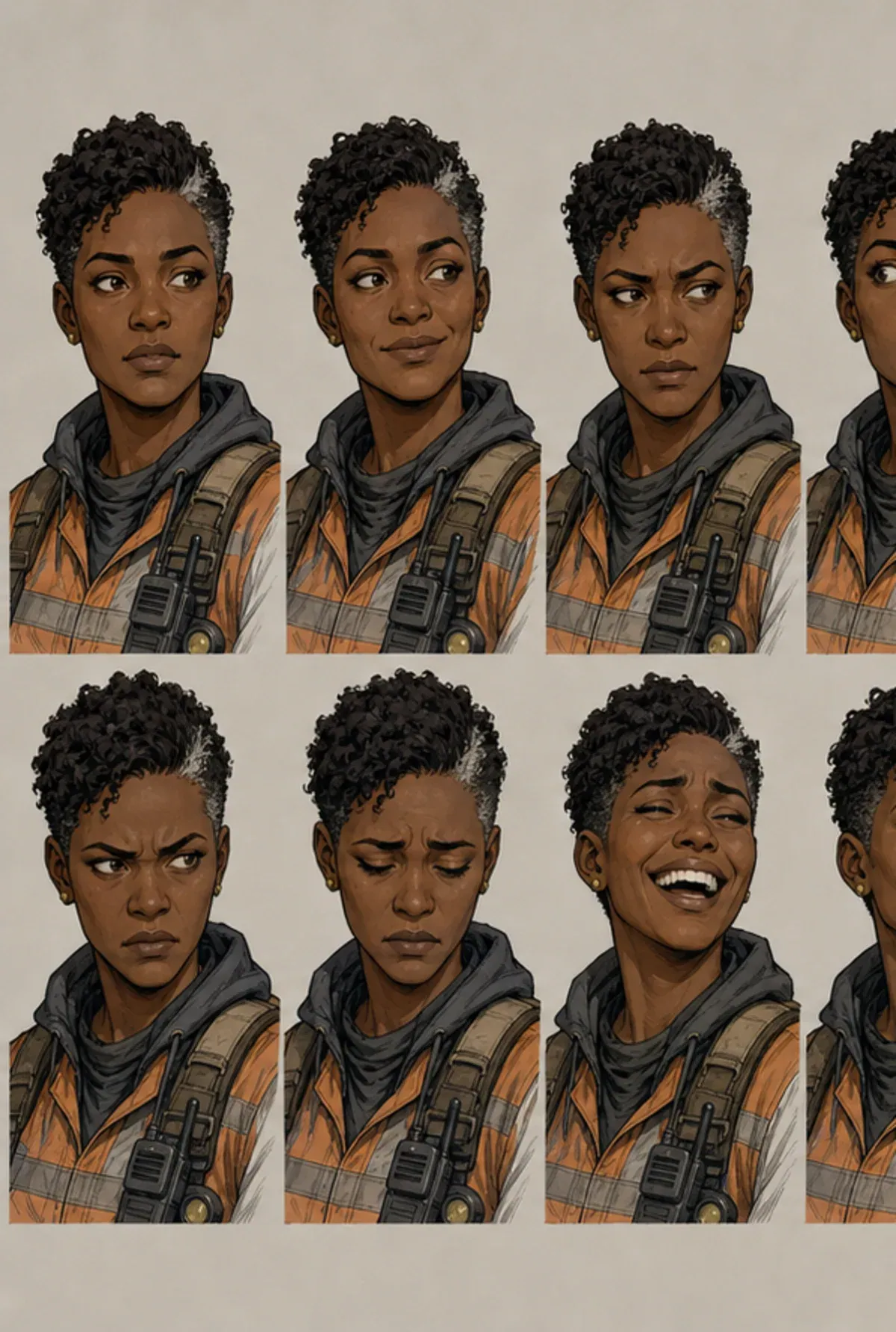
Graphic-novel character expression sheet with eight distinct emotions and consistent facial identity

Eight acting beats, one identity

This example separates neutral listening, restrained amusement, suspicion, surprise, anger, held-back grief, laughter, and resolve. The hairline, face length, eyebrow notch, nose, costume collar, and crop remain stable so the viewer reads a change in thought—not a new person.

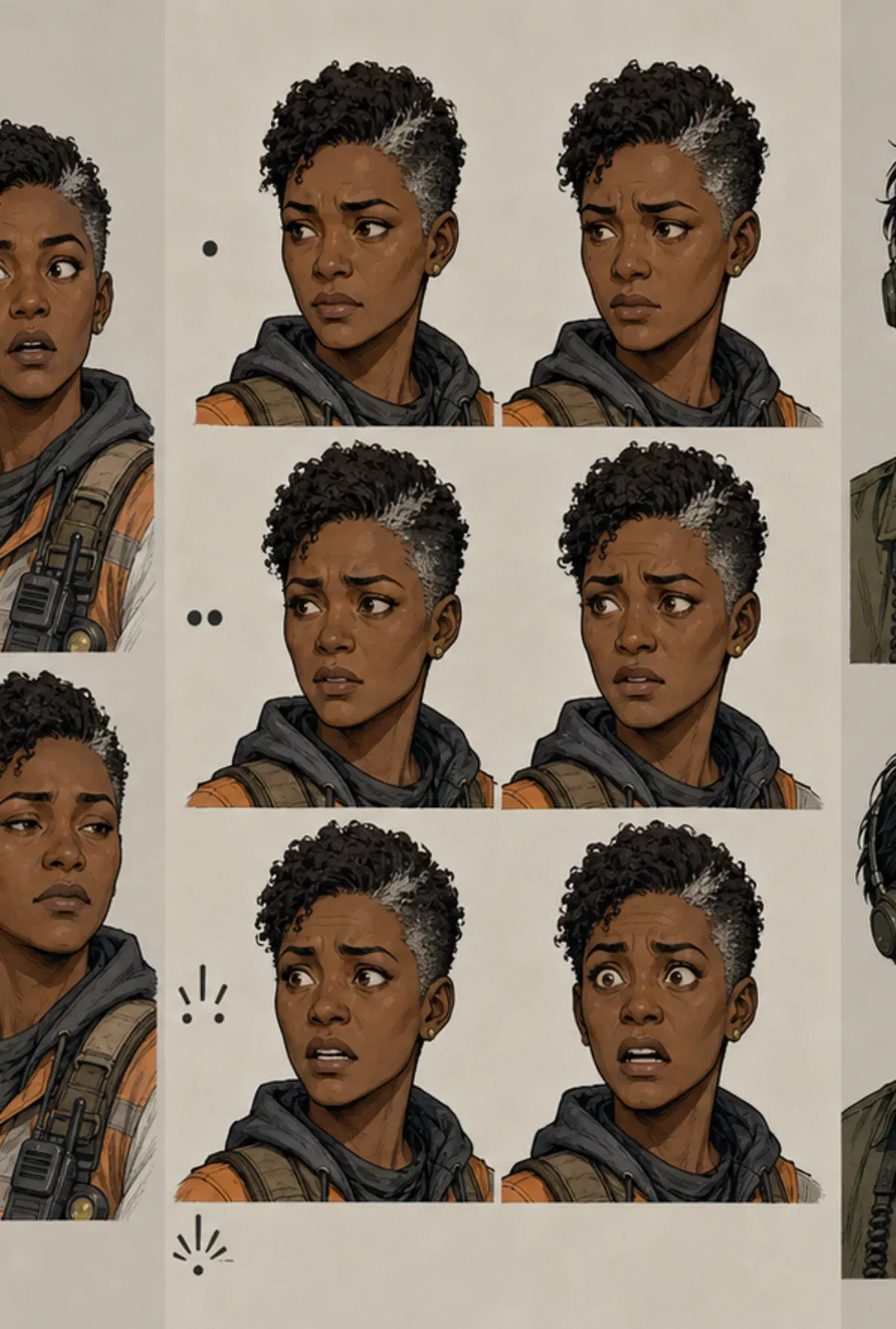
Character expression intensity study progressing from subtle concern to alarm

An intensity ladder for one emotion

A useful intensity study does not merely make the mouth larger. Brow compression, upper-lid exposure, pupil direction, cheek tension, jaw position, and neck posture increase in a controlled sequence. The middle beats often give comic artists the most reusable acting choices.

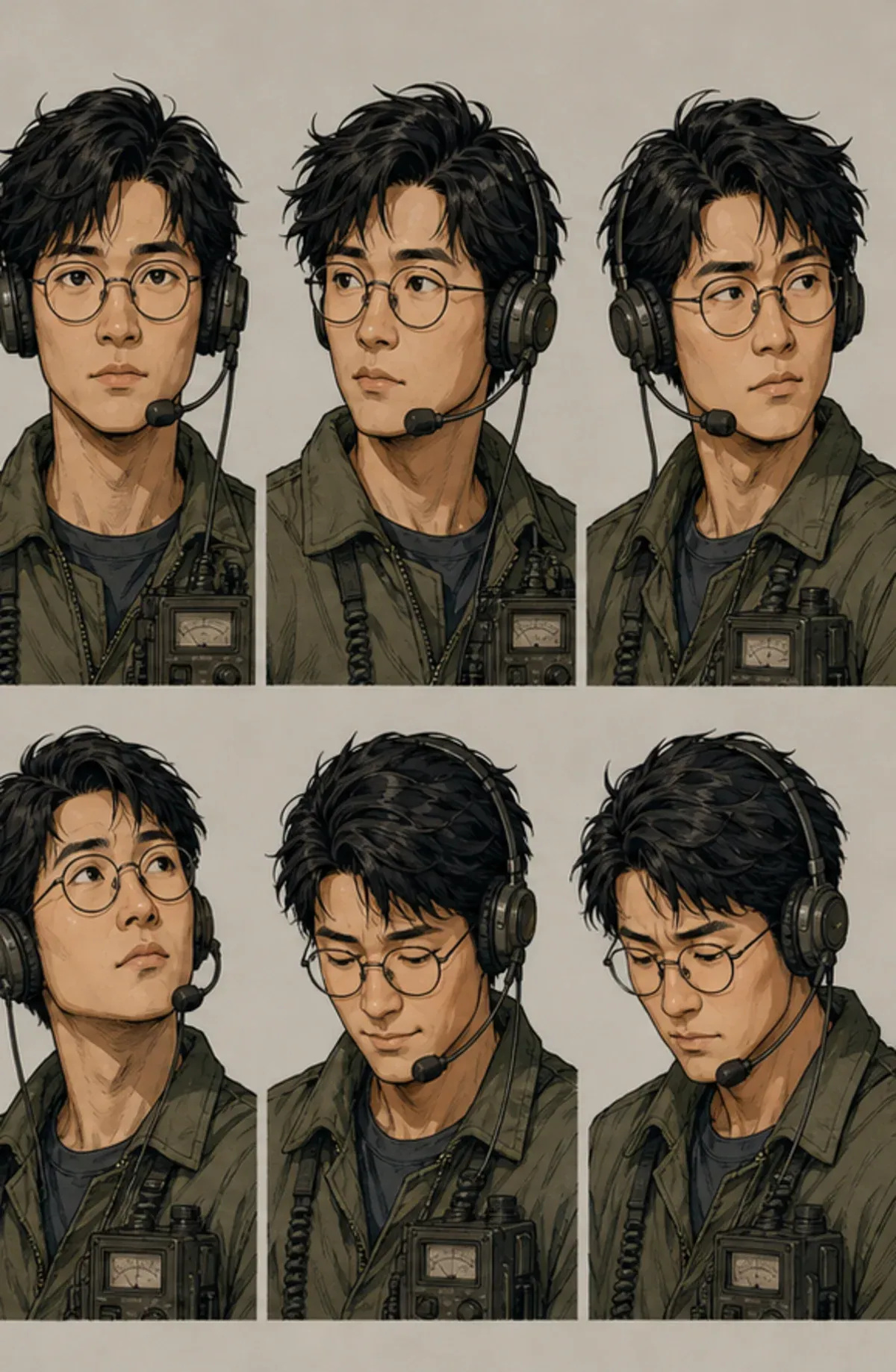
Comic character head-angle sheet showing front, three-quarter, upward, and downward views

Angle changes without identity drift

Changing angle tests whether the character still reads when the nose overlaps the far cheek, glasses turn in perspective, or the chin covers more of the neck. This is a planning image, not a measured turnaround; hidden forms remain model proposals that an artist should review.

1

Start with identity anchors, not a list of emotion words

A character expression sheet generator is most useful when it knows what is allowed to move and what must remain stable. “Young detective, eight emotions” does not establish that boundary. The image model may change the jaw, age, hairstyle, eyelid shape, or costume from cell to cell because none of those features has been declared as an identity anchor. Start with structural facts an illustrator could check: face length, jaw width, cheek volume, eye spacing, upper-lid weight, nose bridge and tip, lip shape, hairline, hair mass, skin tone, visible age cues, and any scar, mole, piercing, or eyebrow break that must recur.

Keep the anchor list selective. If every incidental feature is fixed, the faces become stiff and the prompt leaves little room for acting. If nothing is fixed, the sheet becomes a gallery of related strangers. Five to eight strong anchors usually communicate identity better than a paragraph of decorative adjectives. “Angular oval face, heavy upper lids, straight nose, short coiled hair with a silver temple streak, notch in left eyebrow” is testable. “Beautiful, cinematic, memorable face” is not. Wardrobe should appear only where the chosen crop reveals it; a collar, scarf, headset, or earring can reinforce identity, while a full clothing inventory wastes attention on a head-and-shoulder sheet.

Story role belongs in the brief because it changes how emotion is performed. A veteran medic may contain panic until the moment the patient is safe. A boastful apprentice may cover embarrassment with anger. A guarded negotiator may smile without relaxing the eyes. These are acting choices, not costume design tasks. The page therefore asks for identity and story role together, while keeping broader silhouette, outfit exploration, or full-body turnaround work on adjacent tools.

2

Write acting beats that can be drawn

Emotion labels such as happy, sad, angry, and surprised are only category names. A production brief needs an observable beat. “Restrained amusement while listening to an obvious lie” gives the artist a reason for one mouth corner to rise while the gaze stays steady. “Grief held back until another character leaves the room” suggests tightened lips, a fixed eye-line, and tension around the lower eyelids rather than an open sob. “Startled recognition, then an attempt to appear neutral” creates asymmetry and competing signals. These descriptions produce a more useful sheet because they specify what the character is doing with the feeling.

Give every beat a distinct job. Two versions of generic anger often differ only in how wide the mouth opens. A stronger set might include controlled warning, offended disbelief, anger redirected into focus, and an uncontrolled outburst. Each one changes the brows, eyes, jaw, head pitch, and gaze in a different combination. For comics, include quiet bridge expressions as well as poster-ready extremes. Listening, processing, withholding, doubting, deciding, and recovering are the faces that connect dialogue balloons and make a conversation feel continuous.

The tool accepts a semicolon-separated list because that format remains editable and readable. You can add an acting note after each label, then inspect the generated specification before using credits. Avoid mutually exclusive directions inside one cell, such as “eyes tightly closed but staring directly at camera,” unless contradiction is the intended performance. Also avoid relying on long generated captions. Image models are unreliable typesetters; concise labels may work as visual cues, but use your lettering workflow for final, accurate expression names.

3

Control intensity instead of asking for exaggerated faces

Intensity is not a single volume dial. It changes which facial regions participate, how far they move, and whether the character still tries to regulate the emotion. At low intensity, the signal may sit in the eyelids, pupil direction, a small brow offset, or compression at the mouth corner. Medium intensity recruits cheeks, jaw, head angle, and posture. High intensity may expose more sclera, raise or compress the brows, open the mouth, tense the neck, or break the character’s normal symmetry. Describing this progression helps the sheet avoid eight equally theatrical masks.

Choose intensity based on the final panel size. A subtle glance that works in a close-up may disappear in a small webtoon panel. An extreme scream that reads in a thumbnail may overwhelm a quiet graphic novel. The example brief asks for mostly medium naturalistic acting, with only surprise and laughter pushed broad enough to survive reduction. This is more precise than saying “expressive but not too exaggerated.” If your comic uses super-deformed reaction inserts, name that as a separate style or separate sheet rather than mixing realistic quiet acting and chibi distortion in one identity test.

An intensity ladder is valuable when one emotion matters repeatedly. Instead of requesting six unrelated feelings, ask for concern at approximately ten, thirty, fifty, seventy, and ninety percent, then describe what changes. The resulting concept can help a writer and artist agree on where a scene begins and peaks. Percentages are planning language, not measured muscle values, so review the sequence visually. The generated raster is evidence to discuss, not an automatic facial-action coding system.

4

Use head angle and eye-line as part of the performance

A face does not act independently of the head. A lowered chin with eyes looking up can read as guarded, challenging, or ashamed depending on the brows and mouth. A slight turn away while the eyes remain on the other speaker can signal reluctance. A raised chin may read as confidence, distance, or a defensive attempt at control. Name the angle and the eye-line when they carry meaning. “Three-quarter right, gaze past camera toward the exit” is more actionable than “dynamic angle.”

Angles also expose identity problems. Front view hides the depth of the nose and the projection of the mouth. Profile view forces decisions about forehead slope, nose tip, lips, chin, and back of skull. Three-quarter view tests eye size, cheek overlap, and the placement of ears or glasses. This generator can propose those forms on a single concept sheet, but it cannot guarantee orthographic agreement. If a side view invents a nose shape you did not specify, treat it as a draft to correct—not a fact created by the model.

Do not overload one sheet with every angle and every emotion. Eight expression cells with eight different camera rotations make it difficult to tell whether a change comes from acting or perspective. A useful core sheet often keeps most cells near front and three-quarter, then reserves a second angle study for up, down, and profile views. The related character sheet generator focuses on front, profile, and back planning views; the pose generator handles full-body action and balance. This page stays focused on facial acting.

5

Design the grid for comparison, not decoration

The grid is part of the specification because comparison depends on consistent framing. A 4 × 2 landscape grid gives eight head-and-shoulder cells enough room for eyes and mouth corners to remain legible on a desktop. A 3 × 2 grid favors six larger studies or an intensity ladder. Equal crop and similar scale make identity drift visible. If one cell is a close-up and another includes the waist, apparent changes in face width or head size become difficult to judge.

Ask for a plain, quiet background and predictable spacing. Decorative scenery competes with the face and may introduce lighting shifts that alter skin tone. Keep costume visible only as a stable collar or shoulder cue. Short labels can help organize a concept sheet, but generated lettering may be misspelled, duplicated, or unreadable. For deliverable production art, download the raster, cover any unreliable model text, and add final labels in a layout or illustration application.

A grid prompt cannot create real layers. The downloaded result is one raster image, even when it visually resembles separate panels. There is no PSD, SVG face rig, transparent cell bundle, or per-expression metadata behind it. If your pipeline needs individual files, crop the approved cells after download and name them according to your own shot or asset convention. If it needs editable line art, use the raster as a drawing reference and rebuild the selected expressions on proper layers.

6

Review the specification before generating

The first action on this page is deterministic: it turns the seven input areas into a structured, editable specification. That review step prevents avoidable credit use. Read it once for identity, once for acting, and once for composition. Identity review asks whether a colleague could draw the same person from the anchor list. Acting review asks whether each cell has a distinct internal beat and visible facial decisions. Composition review asks whether the requested number of cells, crop, angle, and labels can fit legibly on one canvas.

Resolve conflicts before starting the image job. A “six-cell 3 × 2 grid” conflicts with a list of eight expressions. “No shading” conflicts with “painterly rendering.” “Profile view” conflicts with “both eyes equally visible.” Shorten long biographical material that does not affect the face. The image API accepts a finite prompt, and the model must distribute attention across all cells; specific priorities outperform an exhaustive character biography.

After sign-in, the page returns to the same localized URL and keeps the brief in session storage. The generation request enters the existing ComicsMaker character-image queue. The interface reports queued and running states, polls the job, shows credit-related recovery, and places the completed image in the workbench for download. If the final attempt fails, the server-side job handles the refund and the written specification remains available for revision. The page does not publish personal generation results as indexable pages.

7

Inspect identity, acting, and usability separately

When the image is ready, do not judge it with one overall impression. First check identity: compare face proportions, hair mass, skin tone, age, signature marks, and visible costume cues across every cell. A strong expression can still be unusable if the jaw narrows, the eyes change spacing, or a defining feature disappears. Mark the cells that preserve identity best and identify which prompt anchor they demonstrate.

Second, check acting. Cover the labels and ask whether the beat is readable from the face and head alone. Look at brows, lid aperture, pupil placement, nose tension, cheeks, mouth corners, jaw, and neck. If two cells communicate the same beat, revise their acting notes rather than simply requesting “more difference.” If a face looks like a symbol pasted onto the character, lower the intensity and describe regulation, asymmetry, or a specific thought.

Third, check production usability. Reduce the image to the size used in your comic. Confirm that subtle expressions survive. Check whether the crop leaves room for hair and chin, whether all cells have similar scale, and whether generated labels need replacement. Select useful faces as references, not as immutable canon. A concept sheet can accelerate discussion and provide direction, but an artist should redraw, correct, or standardize it for published continuity.

8

Know when to use an adjacent character tool

Use AI character design when the identity itself is unresolved: silhouette, age, body type, outfit construction, palette, props, and medium. That work should happen before a detailed expression library, because a changing face design makes expression comparison meaningless. Use the character sheet generator when you need front, profile, back, palette, and prop callouts on one planning canvas. Those views focus on construction, not performance.

Use the AI character pose generator when the task concerns the full body: line of action, weight distribution, contact points, foreshortening, camera height, and negative space. A raised shoulder or clenched hand may support emotion, but this expression page deliberately concentrates on head-and-shoulder acting. Use the comic character maker when you need a broader character concept connected to a comic workflow. Clear boundaries prevent multiple pages from competing for the same search intent and help you choose the shortest useful path.

A practical sequence is design brief, construction sheet, core expression sheet, pose studies, then selected comic panels. You do not need to complete every artifact for every minor character. A protagonist with nuanced dialogue may warrant several expression and pose sheets. A background shopkeeper may need one stable concept and three readable reactions. Build only the reference material that reduces real uncertainty in the next production step.

Character expression sheet generator FAQ

What is a character expression sheet?

A character expression sheet is a reference page that shows the same character performing a selected range of emotions. It records identity anchors, acting beats, intensity, head angles, crop, and drawing style so an artist can make later panels feel related.

Does this generator make an animation-ready model sheet?

No. It generates one raster concept image after you review an editable specification. It does not produce a rig, vector controls, layered PSD, measured turnaround, blend shapes, or a trained identity model.

How many expressions should I put on one sheet?

Six to eight expressions are usually readable on one landscape concept sheet. More cells reduce face size and make subtle eye and mouth decisions harder to inspect. Split a large library into a core acting sheet and separate intensity studies.

How do I keep the character recognizable?

Name a small set of structural anchors: face length, jaw shape, eye spacing, eyelid weight, nose profile, hair silhouette, age cues, and one or two signature marks. Keep those fixed while changing the muscles and pose that carry the emotion.

Can I download and edit the result?

You can download the completed raster image. Edit the written specification before generation or revise it and run another image job. The result itself is not a layered production file, so paint-over work happens in your preferred image editor.

What happens if the image job fails?

The page reports the failed state and preserves the written brief in the browser. The existing generation service refunds the charged credits after the final failed attempt, so you can simplify the sheet or correct conflicting directions before retrying.

Build a character expression sheet around acting decisions

Build editable expression-sheet specification