AI pixel art generator

AI pixel art generator for editable asset drafts

Describe a character, sprite sheet, background, or icon set. Choose a logical canvas, palette, pixel density, and background treatment, then generate and download the PNG on this page.

Text or image input Five practical controls PNG download

Create one pixel-art asset

Describe what must be visible in the result

0/1600

Plain key color requests a uniform removable background. The downloaded PNG is not guaranteed to contain transparency.

Generated pixel art

Curated original courier pixel-art sprite sheet with four poses
Curated example, not your result. Complete a live job to replace it.

Generated examples

Examples of sprites, backgrounds, and icon sets

These three original examples were made for this page to show different pixel-asset jobs. They demonstrate direction, not a promise of identical output. Inspect every generation at its intended display size and at a zoomed pixel view.

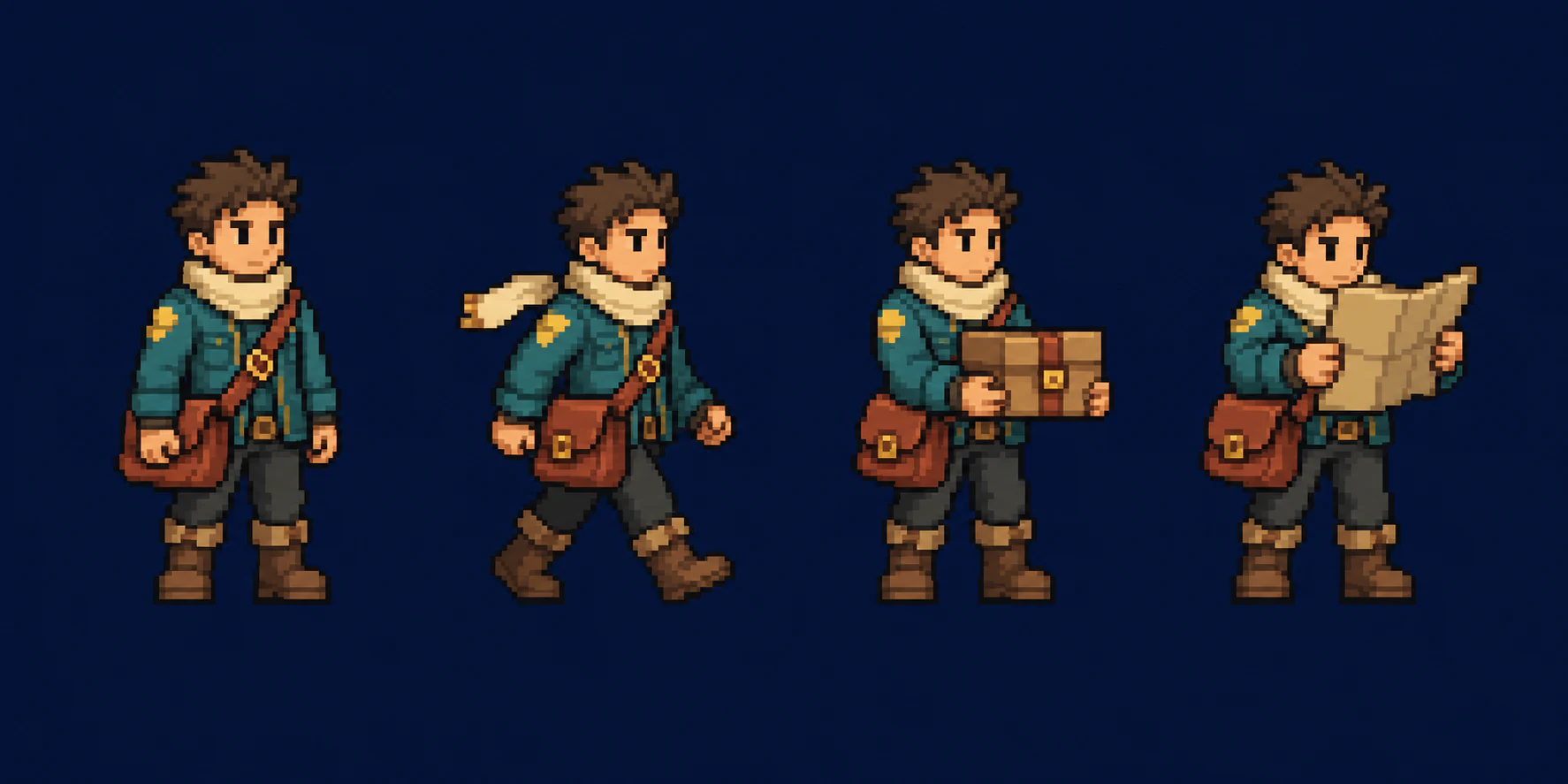
Original courier sprite sheet with four full-body pixel-art poses

Courier sprite sheet

Sprite sheet · 48-pixel feel · Warm limited palette

Prompt: Four full-body poses of one mountain courier, teal jacket, cream scarf, square satchel, rust boots, warm limited palette, no text.

Four separated poses share clothing, proportions, and outline weight. The image is a concept sheet, not a sliced animation file.

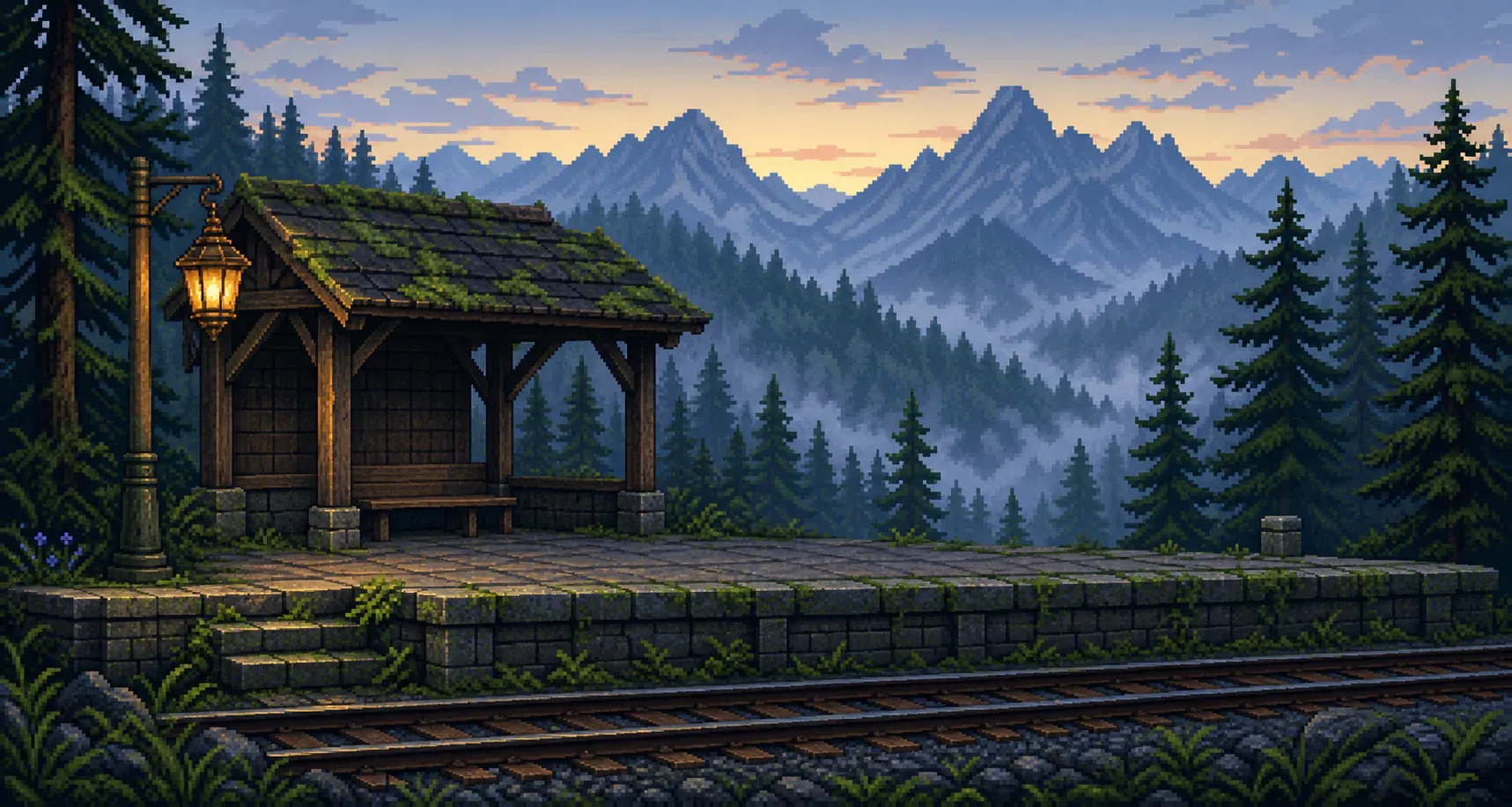
Original wide pixel-art mountain station environment at dawn

Forest station background

Background · Detailed clusters · Cool full color

Prompt: Wide side-view forest railway station at dawn, track in front, small shelter and platform in the middle, mountains behind, open space for characters.

Foreground track, platform, shelter, forest, and mountains create readable depth. No collision map, tile layer, or parallax layer is included.

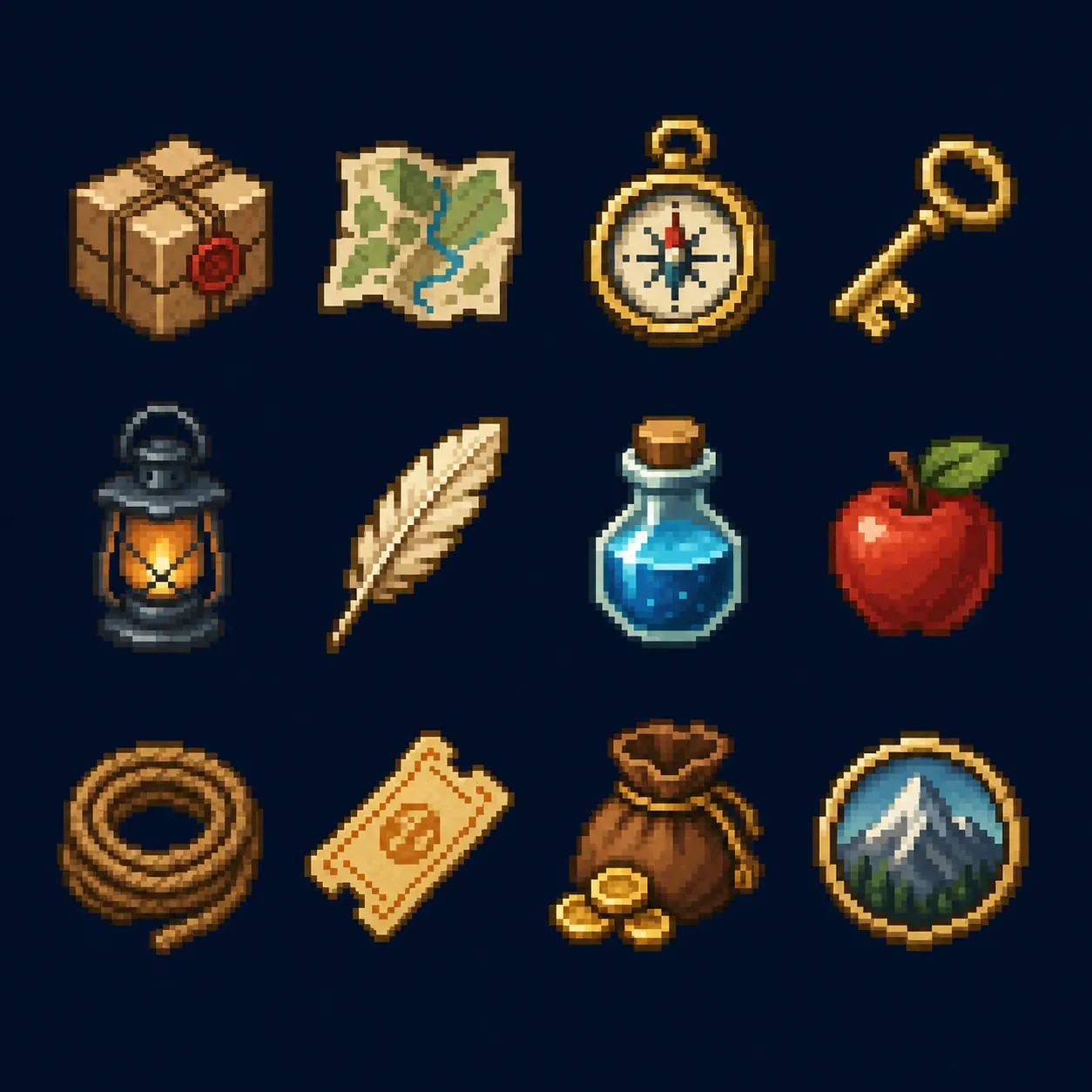
Original pixel-art fantasy courier inventory icon contact sheet

Courier inventory icons

Icon set · 32-pixel feel · Warm 16-color direction

Prompt: Twelve separated courier inventory icons, one object per cell, shared outline weight, upper-left light, warm sixteen-color direction, navy background.

The objects remain distinct at thumbnail size. The contact sheet still needs manual slicing before use as separate interface assets.

Start with a visible asset brief

AI pixel art generator from text

An AI pixel art generator from text is useful when you can describe the asset before you can draw its pixel clusters. The brief should identify one deliverable: a character sprite, a four-pose sheet, a background, or an icon set. Then describe visible facts in production order. For a character, state role, silhouette, pose, clothing, carried object, dominant colors, viewing direction, and any elements that must not appear. For a background, state camera orientation, foreground, middle distance, far distance, landmarks, open areas needed for characters, time of day, and lighting. For icons, list every object and the shared palette, outline weight, lighting direction, and spacing. Concrete nouns and spatial instructions are more useful than broad mood words because you can compare each requested feature with the result.

The logical canvas control is not a promise that the downloaded file will literally measure 16 by 16 or 32 by 32 pixels. The generated image is a larger PNG guided by the selected visual scale. A 16 × 16 request asks for an extremely simple silhouette and very few clusters, while 64 × 64 or 128 × 128 allows more costume, material, facial, and environmental information. A complex brief forced into a tiny logical grid often produces noisy micro-details that only resemble pixel art when viewed at full size. If an exact game-ready canvas is required, reduce or redraw the approved direction in a pixel editor, use nearest-neighbor scaling, and inspect every cluster at 100 percent and at the final display size.

Write one prompt around one reviewable job. “A complete fantasy game” is not an asset brief. “One side-view mountain courier with a square satchel, folded route map, teal jacket, cream scarf, rust boots, readable idle pose, no text, warm sixteen-color palette” is reviewable. The output can be checked for silhouette, palette discipline, object count, pose, unintended symbols, and edge treatment. If the first generation misses an essential feature, change the sentence that controls that feature instead of adding unrelated style adjectives. Keep successful constraints, remove contradictions, and regenerate one variable at a time. This produces a useful visual-development record even when the first draft is not ready for production.

Generate pixel art from text
Original pixel-art courier sprite sheet with four readable poses

Use a reference you are allowed to use

Convert an image to pixel art

To convert an image to pixel art, upload a PNG, JPG, or WebP that you have permission to use and write what the generated version should preserve. A source image can provide a silhouette, pose, broad composition, prop arrangement, or color relationship. It does not lock the original pixels. The model creates a new image and may change facial identity, anatomy, costume details, object geometry, logos, or background structure. A clean source with one dominant subject generally provides clearer guidance than a crowded photograph. Crop away unrelated people and objects before upload, then name the subject and the visual features that matter in the written brief.

Choose the asset type based on the result you need, not the format of the source. A portrait can guide a full-body character, but unseen clothing and pose must be inferred. A landscape photograph can guide a background, but the generator may simplify buildings, foliage, and perspective to fit the requested grid. A sketch of six objects can guide an icon set if each object is separated and identified. For a pose sheet, the uploaded character may help with colors and silhouette, yet consistency across poses is still generated rather than mechanically transformed. Review each pose for proportions, carried items, left-right reversals, and accidental changes before slicing or animating it.

Rights and quality checks belong to the workflow. Do not upload identity documents, private photographs, protected characters, logos you cannot use, or another creator’s work merely to reproduce it. Describe original visual properties rather than requesting the signature style of a named living artist. After generation, zoom in and check the subject outline, hands and faces, repeating textures, object counts, unintended letters, color ramps, and any details that could be mistaken for a brand mark. The downloaded result is a flat PNG, not a layered source file, tile map, vector, or editable sprite project. Save the written brief and settings alongside approved assets so later revisions have a clear reference.

Convert a reference image
Original twelve-object pixel-art inventory icon set on a navy background

Choose one deliverable per job

Create pixel characters, sprites, and backgrounds

Character sprites need a silhouette that survives small display. Identify the viewing direction, stance, major clothing masses, hair shape, carried item, and two or three dominant color groups. Small decorative details should support recognition rather than fill every empty cluster. A single character result is appropriate for a concept, portrait-like game token, dialogue avatar, or the baseline for manual sprite editing. A four-pose sprite sheet asks the model to repeat one design across separated poses, but it is still a generated contact sheet. It does not guarantee equal cell boundaries, identical proportions, animation arcs, frame order, or engine-ready export. Use it to establish pose vocabulary, then normalize the frames in a sprite editor.

Background scenes require different priorities. State whether the image is side-on, top-down, isometric-like, or a frontal environment. Define the depth planes and leave deliberate open space where characters or speech balloons may be placed later. A forest station might use track in the foreground, platform and shelter in the middle distance, and mountains in the distance. Palette and atmospheric contrast should separate those layers without relying on smooth blur. The generated PNG does not include tiles, collision data, parallax layers, or editable objects. If the background is destined for a game or scrolling comic, use the result as a visual source and rebuild the required layers at exact production dimensions.

Icon sets succeed when the object list and shared rules are explicit. List each object, request one object per separated cell, define the apparent icon scale, use one lighting direction, and keep a consistent outline or edge policy. Then test the result at the actual interface size. An icon that looks rich at 400 percent may collapse into an unreadable patch at 24 pixels. Character, background, and icon assets can later feed a larger story workflow, but this page intentionally stops at asset generation. Use the sprite comics maker to arrange approved pixel assets into panels. Use the comic character maker for a reusable non-pixel character specification, or the comic panel generator for a complete story image.

Create a pixel-art asset
Original wide pixel-art forest railway station background at dawn

Make the constraints visible

Choose canvas size, palette, and pixel density

Canvas size, palette, and pixel density control different parts of the image. Logical canvas size defines how much information the asset should appear to hold. Pixel density defines the cluster scale inside that design: chunky uses larger blocks and favors silhouettes; balanced allows readable clothing, materials, and environmental cues; detailed allows smaller clusters and texture while still asking the model to avoid smooth painting. Palette defines the color system. Four-color olive is intentionally strict. Warm and cool sixteen-color directions limit the visual range while preserving several value steps. Restrained full color allows broader hues but still asks for intentional ramps rather than uncontrolled photographic color.

Canvas, palette, density, and background choices guide the generated image rather than applying decorative filters afterward. They influence the result but cannot guarantee mathematical compliance. The image may use extra colors, create uneven pseudo-pixels, soften a diagonal, or add detail that does not align to the intended grid. Review it with hard nearest-neighbor zoom rather than smooth browser interpolation. Count colors when the production has a strict palette, and use a pixel editor for exact palette replacement, grid alignment, and cluster cleanup.

Background treatment has three honest outcomes. Solid color asks for one simple contrasting backdrop behind the asset. Complete scene asks the generator to design contextual surroundings. Plain key color asks for a perfectly uniform removable color, which can make later manual extraction easier. It does not guarantee native transparency, clean alpha edges, or a background-free PNG. Hair, smoke, glow, glass, soft shadows, and colors close to the key can make removal difficult. For production transparency, remove the key in an image editor, inspect the edge pixels, and clean any color spill. The final asset still needs testing against both light and dark backgrounds before it is considered ready.

Try the pixel controls
Pixel-art sprite poses showing crisp clusters and a restrained warm palette

Use the right page for the next job

From one pixel asset to a finished comic workflow

Use this page while the deliverable is one source asset. Keep the brief, logical grid, palette, density, and background choice with the downloaded PNG. When the work changes from creating an asset to arranging story beats, move to the sprite comics maker for panel layout and dialogue. Use the character or panel tools when continuity and complete scene composition become more important than a single pixel asset.

Frequently asked questions

AI pixel art generator questions

Does the generator return a true 16 × 16 sprite file?

No. Canvas size is a visual design constraint. The download is a larger flat PNG for review, so an exact production grid may still require nearest-neighbor resizing, cleanup, and manual alignment.

Can it convert a photo or drawing into pixel art?

Yes, as an image-to-image generation job. Upload a permitted PNG, JPG, or WebP under 5MB and describe what should remain. The result is newly generated, so identity, geometry, text, and fine details can change.

Does plain key color mean transparent PNG?

No. It requests one uniform background color that may be easier to remove later. It does not guarantee an alpha channel or clean native transparency.

Can I create a ready-to-import game sprite sheet?

The generator can create a visual pose sheet, but it does not output frame metadata, animation timing, collision boxes, equal cell slicing, or engine-specific files. Verify and prepare those parts in a sprite editor.

What happens if generation fails?

The page retries a temporary generation failure automatically. If the final attempt also fails, the credits charged for that image are returned and the page explains what to do next.

Is this the same as the sprite comics maker?

No. This page creates individual pixel-art source assets. The sprite comics maker is the downstream assembly tool for arranging approved sprites, backgrounds, panels, and dialogue into a comic.